|
Modern and Wild Energy |
Frontier Energy |


What is Energy for?
Energy determines the number of battles a user can play. While modern and wild formats share an energy system, frontier format energy stands alone. Survival format uses no energy and instead removes defeated cards from survival play.
*Wood league does not require energy.
How Does the Energy System Work?
- Each account will automatically be allocated a maximum of 50 energy
- Frontier energy is separate from modern and wild energy, which is shared.
- Each ranked battle will use 1 energy
- Energy regenerates at the rate of 1 energy per hour.
- Note the timer that appears below the energy bar
-
The amount of Energy a player has does not impact the amount of rewards they can earn.
Once your energy is depleted, you will not be allowed to play unless additional energy is purchased.
- Frontier energy can only be regenerated or won in advancement chests.
-
Players may purchase additional modern and wild energy per day with DEC/DEC-B tokens, Glint, Cinder, or Credits.
The cost scales up by 50% after every 25 additional energy purchased per day.
The timer on these additional energy purchases resets at midnight UTC.
DEC used to purchase energy is burned.
Credits that are used to purchase energy will have an equivalent amount of DEC burned.
Energy purchases require the Posting Key.
-
Modern and wild energy can now be obtained via Rewards Shop Loot Chests.
Energy found in chests will be added to your energy balance. Your balance can exceed 50 energy.
Only if your balance sinks below 50 energy will it automatically regenerate - regardless of where it was before opening chests.
*Energy replaced the previous Capture Rate (CR) system: Announcing a New Energy System for Splinterlands Ranked Battles.
How Can I Purchase Energy?
Players have the option to purchase additional energy each day. Energy can be purchased with DEC/DEC-B tokens, Glint, or with credits. In both cases, DEC, or the equivalent, will be burned. To purchase Energy, follow the steps below.
Step 1: Click the + icon next to the Energy bar on the Battle page:
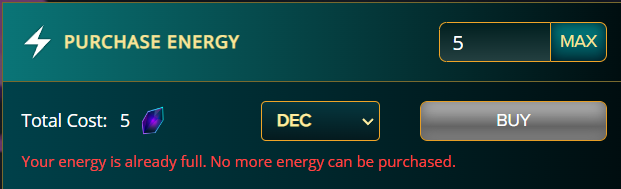
Step 2: View the Purchase Energy page, and input the desired amount of Energy you want to purchase:
Step 3: Use the drop-down menu to select DEC, DEC-B, Glint, or Credits:
- Use the MAX button to correctly calculate how much energy will take you to 50 or the max you can buy with your available balance.
Step 4: Click BUY and confirm the transaction when prompted.
Step 5: Note your increased Energy:
**Note: You cannot buy Energy if the bar is already full.
The Cost of Energy
** Note - The cost scales up by 50% for every 25 additional energy purchased per day. The timer on these additional energy purchases resets at midnight UTC.
Where Can I View My Energy History?
View your Energy Purchase history in your Splinterlands Currency Activity CSV: FAQ. Navigate to the Other column and select Purchased Energy or Reward Energy.